Does OneDrive Work in China? The 21Vianet Sovereign Cloud, File-Storage Residency & Cross-Border Data
OneDrive for Business is available in mainland China — but through a separate, in-country service, Microsoft 365 operated by 21Vianet (世纪互联), with its own endpoints (*.sharepoint.cn), not the global service on *.sharepoint.com. The real decision for a China-facing deployment isn't sync speed — it's file-storage residency: running your global OneDrive from the mainland keeps each user's synced work files on Microsoft's commercial cloud outside China, a PIPL cross-border transfer, while the data-resident lawful path is the 21Vianet-operated OneDrive. A compliance-first look at the two services, the cross-border-data question, CSL Article 39 (formerly Article 37) residency, and the lawful in-country path.
Does OneDrive work in China?
Yes — OneDrive for Business is available in mainland China, but through a separate, in-country service: OneDrive delivered via "Microsoft 365 operated by 21Vianet" (世纪互联), not the global service you reach on *.sharepoint.com. Microsoft documents this China service on its own endpoints (*.sharepoint.cn) with its own sign-up, operated inside the mainland by 21Vianet.
Because a lawful in-country option exists, the real decision is file-storage residency, not speed. OneDrive is where each person's work files live — documents, spreadsheets, contracts and exports synced from a laptop or phone, much of it personal information under Chinese law. Sync that on the global service from the mainland and the files sit on Microsoft's commercial cloud outside China, a PIPL cross-border transfer (and, for a CII operator, a residency problem under Cybersecurity Law Article 39 (formerly Article 37)); larger or sensitive transfers can add a CAC data-export security assessment. The data-resident path is the 21Vianet-operated OneDrive — subject to availability, packaging and feature parity, which you confirm with Microsoft and 21Vianet.
21YunBox maps the service choice, localizes your file storage onto the data-resident China path, and delivers the China-facing app that surfaces and shares those files in-country on ICP-filed infrastructure — so it runs legally in the mainland. It is a lawful in-country deployment, not a way around anyone's terms, and we never use or suggest circumvention. Treat the specifics as a risk to confirm with counsel.
What Microsoft OneDrive's own documentation says about China
| Fact | Primary source |
|---|---|
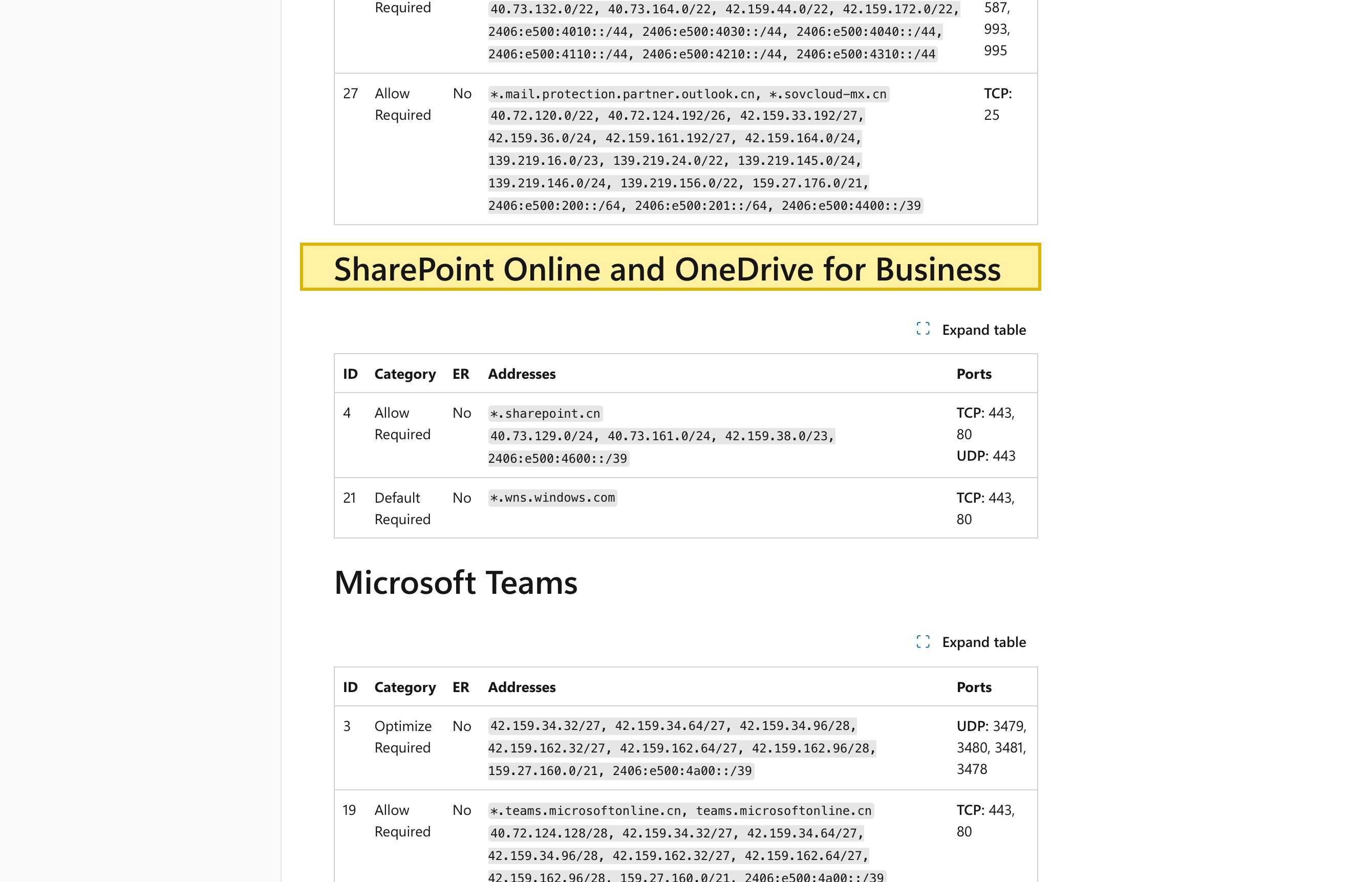
| OneDrive for Business runs in China on the 21Vianet-operated Microsoft 365. Microsoft's network documentation lists “SharePoint Online and OneDrive for Business” among the service areas of Microsoft 365 operated by 21Vianet, served on the in-country endpoint *.sharepoint.cn — separate from the global *.sharepoint.com service. | Microsoft Learn — URLs and IP address ranges for Microsoft 365 operated by 21Vianet (learn.microsoft.com), updated 2026-07-31, retrieved 2026-10-08 |
| The China service is operated by 21Vianet and keeps data in-country. Microsoft's service description states that “21Vianet operates, provides, and manages delivery of the service,” and that “21Vianet operates local Microsoft 365 data centers to provide the ability to use Microsoft 365 services while keeping data within China.” | Microsoft Learn — Microsoft 365 operated by 21Vianet, Service Descriptions (learn.microsoft.com), retrieved 2026-10-08 |
| OneDrive is per-user storage for an individual's own work files. Microsoft's OneDrive service description states that OneDrive storage is “provisioned on a per user basis and is designed to serve the needs of individual users” — so a China OneDrive decision is about where each person's synced work files, not a shared team store, reside. | Microsoft Learn — OneDrive service description (learn.microsoft.com), updated 2026-07-23, retrieved 2026-10-08 |
| Syncing China users' files to an offshore tenant is a cross-border transfer. Sending a Chinese user's personal information to OneDrive hosted outside the mainland triggers PIPL Chapter III (Articles 38–43): notice, a separate consent, and one transfer mechanism — a CAC security assessment, the CAC standard contract, or certification — with in-country storage under Article 40 (and Cybersecurity Law Article 39 (formerly Article 37)) for CII operators. | Personal Information Protection Law of the PRC, Chapter III, Articles 38–43 (cac.gov.cn), retrieved 2026-10-08 |
Sources verified by the 21YunBox compliance team on 2026-10-08.
For a mainland-China audience, the first question about OneDrive is not how fast a file syncs — it is which OneDrive you mean. Microsoft runs two separate services that matter here: the global commercial OneDrive for Business most teams already use on .sharepoint.com, and a distinct, in-country service — OneDrive for Business delivered through Microsoft 365 operated by 21Vianet (世纪互联) — served from datacenters inside the mainland on its own endpoints (.sharepoint.cn), with its own sign-up. So the honest answer to “does OneDrive work in China?” is yes — but through a specific service, on a specific footing.
Because a lawful in-country option already exists, the decision moves off the speed axis and onto a residency one. OneDrive is where individual users’ work files live — the documents, spreadsheets, contracts, and exports each person syncs from a laptop or a phone, much of it personal information under Chinese law, some of it important data. Sync those files from the mainland on the global service and each user’s files sit on Microsoft’s commercial cloud outside China, which is a cross-border transfer under PIPL; keep them on the 21Vianet-operated service and they stay in-country. Which service you stand up, and how you deliver the app that surfaces or shares those files, is the compliance question — not the sync time.
Microsoft OneDrive in China at a glance
| What decides it | In Microsoft's own terms — and China's law |
|---|---|
| What it is | OneDrive for work and school (OneDrive for Business) — per-user cloud file storage and sync, provisioned to individual licensed users and included with Microsoft 365. Two services matter for China: the global commercial service on *.sharepoint.com, and a distinct in-country service — OneDrive delivered through Microsoft 365 operated by 21Vianet (世纪互联), run inside the mainland. |
| Is it available in the mainland? | Yes — through the separate 21Vianet-operated service. Microsoft's network documentation lists "SharePoint Online and OneDrive for Business" on the in-country endpoint *.sharepoint.cn, distinct from the global *.sharepoint.com. It is a separate tenant with its own sign-up; availability, packaging, and feature parity can differ and change — confirm with Microsoft and 21Vianet. |
| Where the files live | On the 21Vianet-operated service, each user's files are kept in-country. On the global service, those synced work files — documents, contracts, HR and finance exports, often personal information — sit on Microsoft's cloud outside the mainland, which is the cross-border question for China users and China data. |
| Cross-border & residency | Syncing China users' files to the global service is a cross-border transfer under PIPL (Articles 38–43: notice, a separate consent, one transfer mechanism). For a critical information infrastructure operator, in-country storage is required under PIPL Article 40 and Cybersecurity Law Article 39 (formerly Article 37); larger-volume or sensitive transfers can add a CAC data-export security assessment. |
| The lawful path | Keep the files in-country on the 21Vianet-operated OneDrive, and deliver the China-facing app, portal, or intranet that surfaces or shares those files on ICP-filed, in-country infrastructure. 21YunBox maps the service choice, localizes your file storage onto the data-resident path, and delivers it in-country — subject to the China service's availability and feature parity, which you confirm with Microsoft and 21Vianet. |
Availability: OneDrive for Business runs on the 21Vianet-operated cloud
OneDrive’s presence in the mainland is set in Microsoft’s own documentation, not by a load-time test. Microsoft’s service description states that, for Microsoft 365 operated by 21Vianet, “21Vianet operates, provides, and manages delivery of the service,” and that “21Vianet operates local Microsoft 365 data centers to provide the ability to use Microsoft 365 services while keeping data within China.” OneDrive for Business is part of that service: Microsoft’s network documentation lists “SharePoint Online and OneDrive for Business” among the China service areas, served on the in-country endpoint *.sharepoint.cn — the mainland counterpart of the global *.sharepoint.com.
Two things follow. First, the China service is a separate tenant with its own sign-up; it is not linked to a global Microsoft 365 tenant, so “turning on China” is a deployment decision, not a switch you flip on the tenant you already run. Second, availability, packaging, and feature parity between the China service and the global service can differ and can change over time — which capabilities and which OneDrive license options are offered inside the 21Vianet cloud is something you confirm directly with Microsoft and 21Vianet before you build. For that reason this page publishes no first-party China sync-time figure for OneDrive: a lawful in-country option already exists, so speed is not the axis the decision turns on.
The cross-border-data story: your files are personal information
The gate that actually decides a China OneDrive deployment is the data. A OneDrive for Business account is rarely just scratch space — it holds the files an individual creates and syncs day to day: customer lists, contracts, HR letters, finance exports, scanned IDs. Synced to a user in China from the global service, those files sit on Microsoft’s commercial cloud outside the mainland, and moving them there is a cross-border transfer of personal information under China’s Personal Information Protection Law. PIPL puts the duty on the handler — you, not Microsoft: Chapter III (Articles 38–43) requires notice, a separate consent distinct from the user’s agreement to use OneDrive, and one transfer mechanism — a CAC security assessment, the CAC standard contract, or certification.
Underneath that sits residency. A critical information infrastructure operator or a large-volume handler must store personal information collected in China inside the mainland — PIPL Article 40, read with Cybersecurity Law Article 39 (formerly Article 37) (renumbered by the 2025 amendment to the Cybersecurity Law, in force January 1, 2026) — a duty the global, offshore service structurally cannot meet. And where data volumes or sensitivity cross the thresholds, the transfer itself needs a CAC data-export security assessment before it may proceed. How heavy each of these is scales with your data and your role, which is why it belongs with counsel rather than a default assumption — a risk to confirm against what your users actually sync.
The data-resident path: OneDrive on the 21Vianet-operated Microsoft 365
The lawful, in-country footing is the one Microsoft already documents: OneDrive for Business on the 21Vianet-operated Microsoft 365, which keeps files inside the mainland on *.sharepoint.cn. On that path the cross-border question does not arise in the same way, because the files do not leave. The work is to plan the deployment onto it — the China service is a separate tenant, so accounts, storage, the sync client’s target, and identity are stood up there rather than migrated from a global tenant by a toggle — and to confirm, up front, that the OneDrive capabilities and license options your teams depend on are offered in the China service. That availability-and-parity check is not a formality; it is the step that tells you whether the data-resident path carries your use case as-is or needs adjustment.
The lawful path — map, localize, deliver
There is a lawful way to run OneDrive for Chinese users, and it has a clear shape: the files stay in-country on the 21Vianet-operated service, and the China-facing app that lets people open, upload, or share those files is itself delivered compliantly inside the mainland. That second half is easy to miss. A portal, intranet, or customer app that embeds a document library, a file picker, or shared OneDrive links is a public-facing service in China, so it carries an ICP filing (备案) duty and needs compliant in-country delivery like any other China property — a file that opens quickly but hangs off an unfiled, offshore front end has only solved half the problem.
That is the footing 21YunBox owns, and it is more than advice. Our China team does three things on it: we map the service choice and your PIPL and data-residency exposure, so you know which OneDrive you should be running and what each option obliges; we localize your file storage onto the data-resident path — standing up and integrating OneDrive for Business on the 21Vianet-operated Microsoft 365, or otherwise keeping the files in-country, in place of a global service that cannot meet the residency duty; and we deliver the China-facing app that surfaces and shares those files in-country on ICP-filed infrastructure — the 21YunBox Optimizer — in front of what you already run, with no rebuild and no re-platform. The result is a OneDrive deployment that runs legally and compliantly for your users in China. What we do not do is route anyone around anyone’s terms or controls: this is a lawful in-country deployment, built on the China service Microsoft and 21Vianet already provide, and we never use or suggest circumvention of any kind.
Related reading:
- Cross-border data transfers under PIPL
- China’s Cybersecurity Law — Article 39 (formerly Article 37) and data localization
- China’s data-export security assessment measures
- How to get an ICP filing for China