Does Adobe Creative Cloud Work in China? Data Residency, ICP & Cross-Border Rules
The Creative Cloud apps run on your machine, but Cloud Documents, synced Libraries and shared assets are stored in Adobe Enterprise Storage on offshore AWS regions — none in mainland China. Those synced assets are proprietary IP that often embeds personal information, so keeping them abroad is a PIPL cross-border and data-residency question. Keeping assets in-country is the lever.
Does Adobe Creative Cloud work in China?
The Creative Cloud apps run on your own machine, so the real question isn't whether Photoshop opens in China — it's where the creative work you sync lands. Adobe's own Trust Center says user-generated content created in Creative Cloud applications is stored in Adobe Enterprise Storage, in a regional data store assigned at provisioning — hosted on AWS in North America, Europe and Japan, with no mainland-China region. Those synced files are your proprietary IP — unreleased designs, campaign artwork, client deliverables — and they routinely carry personal information: a mockup built on real customer records, a video of real people, a design review full of client names. Storing that offshore is a cross-border transfer under the Personal Information Protection Law, and for a critical information infrastructure operator or large-volume handler the Cybersecurity Law Article 39 (formerly Article 37) requires China-collected personal information to stay in the mainland. Because the apps work on local files, the lever exists: keep creative assets local or in-country, minimize Creative Cloud sync, and stand up a compliant ICP-filed in-country storage and review footing for what must be shared.
What Adobe Creative Cloud's own documentation says about China
| Fact | Primary source |
|---|---|
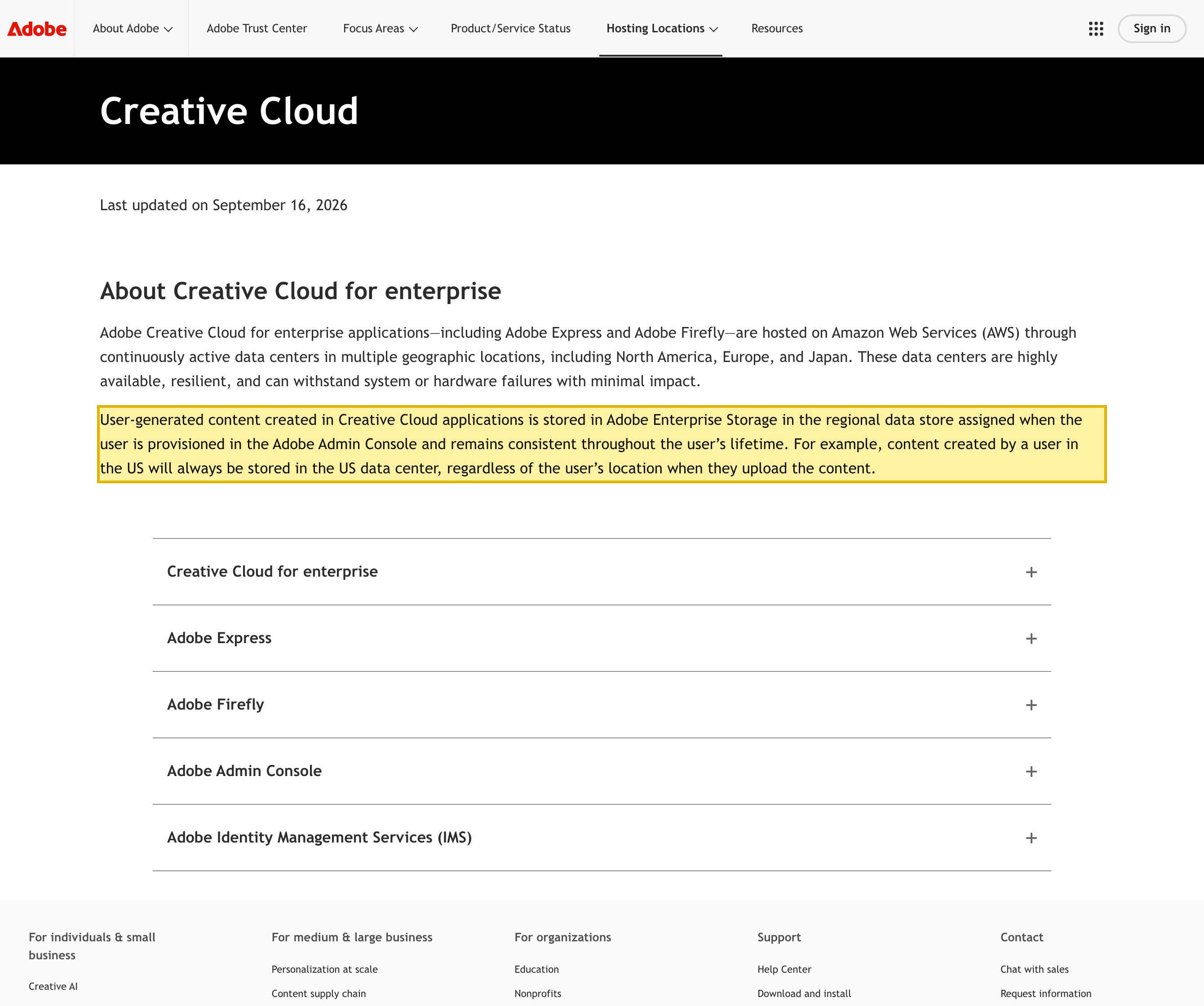
| Adobe's Creative Cloud Trust Center states that “User-generated content created in Creative Cloud applications is stored in Adobe Enterprise Storage in the regional data store assigned when the user is provisioned in the Adobe Admin Console.” Your synced creative assets live on Adobe's cloud, not on your device alone. | Adobe Trust Center — Creative Cloud Hosting and Storage (retrieved 2026-10-13) |
| The same page says Creative Cloud for enterprise applications are “hosted on Amazon Web Services (AWS) through continuously active data centers in multiple geographic locations, including North America, Europe, and Japan.” None of the named regions is in mainland China, and content stays in its assigned region for the user's lifetime. | Adobe Trust Center — Creative Cloud Hosting and Storage (retrieved 2026-10-13) |
| Under the Personal Information Protection Law, storing personal information collected in China outside the mainland is a cross-border transfer (数据出境): the handler must give notice, obtain separate consent, and clear a transfer mechanism — a CAC security assessment, the CAC standard contract, or certification (PIPL Articles 38–40). | Personal Information Protection Law, Articles 38–40 (retrieved 2026-10-13) |
| For a critical information infrastructure operator, the Cybersecurity Law Article 39 (formerly Article 37) requires personal information collected in China to be stored within the mainland — a duty no offshore Creative Cloud region can meet. | Cybersecurity Law, Article 39 (formerly Article 37) (retrieved 2026-10-13) |
Sources verified by the 21YunBox compliance team on 2026-10-13.
For a mainland-China audience, the question worth asking about Adobe Creative Cloud is not whether Photoshop or Illustrator open — the desktop apps run on your own machine — but where the creative work you sync is allowed to live. Creative Cloud is also a storage and collaboration service: Cloud Documents, synced Libraries, fonts and shared assets are kept in Adobe’s cloud, not only on your disk. Those synced files are your proprietary creative work — unreleased product designs, brand and campaign IP, client deliverables — and they routinely carry personal information inside them. So the deciding question is a residency one: when your assets and the personal data embedded in them sync to Adobe’s offshore cloud, that is a cross-border and data-localization matter China’s law governs, not a performance problem. Opening the editor is not the issue; where your assets land when they sync is.
Adobe Creative Cloud in China at a glance
| What decides it | In Adobe's own terms |
|---|---|
| Where your assets live | By Adobe's own Trust Center, user-generated content created in Creative Cloud applications is stored in Adobe Enterprise Storage, in a regional data store assigned when the user is provisioned — on AWS in North America, Europe or Japan. None of the named regions is in mainland China. |
| What is inside those assets | The synced files are your proprietary creative work — unreleased designs, campaign artwork, client deliverables — and they routinely embed personal information: real customer records in a mockup, real people in a video, client names and comments in a design review. |
| The cross-border transfer | Personal information inside assets you collect in China and sync to Creative Cloud is written to that offshore store — a cross-border transfer PIPL governs, with the duty on you, the customer, not Adobe. |
| When the rules bite harder | For a critical information infrastructure operator or a high-volume handler, personal information collected in China must be stored inside the mainland (Cybersecurity Law Article 39 (formerly Article 37); PIPL Article 40) — a duty no offshore Creative Cloud region can meet. |
| The in-country lever | The desktop apps work on local files, so you can keep proprietary and PII-bearing assets local or in an in-country store, minimize Creative Cloud sync for them, and stand up a compliant in-country review and handoff footing with an ICP filing. |
| Is it reachable? | Whether the apps and Creative Cloud load from a given city in China settles nothing. Reachability is not the compliance question — where your assets and the personal information inside them live is. |
Where your Creative Cloud assets actually live
Creative Cloud is two things at once: desktop applications that run locally, and a cloud that stores and shares your work. Adobe’s own Trust Center describes the second part plainly — “User-generated content created in Creative Cloud applications is stored in Adobe Enterprise Storage in the regional data store assigned when the user is provisioned in the Adobe Admin Console and remains consistent throughout the user’s lifetime.” The same page says those applications are “hosted on Amazon Web Services (AWS) through continuously active data centers in multiple geographic locations, including North America, Europe, and Japan,” and gives the example that “content created by a user in the US will always be stored in the US data center.”
The catch for China is the menu you get to choose from: none of the named regions is inside mainland China, and your content is pinned to its assigned region for the lifetime of the account. So the moment your team’s Cloud Documents, synced Libraries and shared assets contain work created for or about people in China, that work is kept abroad — and that, not latency, is what China’s data law responds to.
It is your IP — and the personal information inside it
A reachability check asks one thing: can I open the editor from Shanghai. It never sees the second exposure. A design or video tool holds your proprietary creative work — the product that has not shipped, the campaign that has not launched, the deliverable the client has not seen — and those files are rarely anonymous. A mockup is rendered with real customer records; a promo cut shows real people; a shared review thread carries client names, collaborator identities and comments. When Creative Cloud syncs or shares those assets, two regulated things leave at once: your creative IP, and the personal information embedded in it. Keeping the design files resident but letting the review links, shared Libraries and Cloud Documents sync offshore solves only half of it; the personal data inside the shared assets has already crossed the border.
Sync your China work to Creative Cloud and it crosses the border
Personal information your team gathers from people in China — customer records in a mockup, identifiable people in a video, named individuals in a review — is written to that one offshore region the moment the asset syncs. Under China’s Personal Information Protection Law, storing it outside the mainland is a cross-border transfer, and the obligation lands on the personal-information handler, which is you as the Adobe customer and not Adobe as the platform. PIPL asks that handler to give affected individuals notice, obtain their separate consent for the transfer, and clear one transfer mechanism: a CAC security assessment, the CAC standard contract, or certification. “We already design in Creative Cloud” settles none of that; reaching the cloud and being cleared to move Chinese personal data into it are different questions.
How much is at stake depends on your role and volume
The weight of these duties is not uniform. A handler that is not a critical information infrastructure operator and moves a smaller volume of non-sensitive personal information in a calendar year can fall under an exemption from the security assessment, the standard contract and certification — a genuinely lighter path for a small studio. At the other end, a CIIO or a large-volume handler carries a data-residency duty: personal information collected in China must be stored inside the mainland (Cybersecurity Law Article 39 (formerly Article 37); PIPL Article 40). No Creative Cloud region can satisfy that, because none sits in China, and “switch to the EU data center” moves the data from one offshore region to another, never into the mainland.
This is a risk map, not a verdict: whether you owe notice and consent only, a full transfer mechanism, or in-country storage of the data itself turns on how much personal information your assets carry and whether your role pulls you into the CIIO or large-volume tier — a question to work through with counsel before you roll Creative Cloud out to a China team.
Why a reachability check misses this
Whether the Creative Cloud apps and sync happen to load from a given city in China changes nothing about the real exposure. A connectivity test confirms the editor opens; it cannot see that your synced assets are stored offshore with no mainland region to choose, or that the personal information inside a shared mockup, video or review has left the country. Those are compliance facts about where data rests, and no amount of network tuning moves where the files and the identities inside them sit.
Where 21YunBox fits — map, localize, deliver
You keep designing in Creative Cloud; nothing is rebuilt. What we add is the layer a creative cloud with no mainland region cannot give you on its own. First we map your creative assets — which are proprietary IP, which embed personal information (real customer data in mockups, real people in videos, client names in reviews), and which of them sync to Cloud Documents, synced Libraries, shared assets and review links versus staying on local disk. Then, where the law treats your case most strictly, we help you localize: keep the proprietary and PII-bearing assets local or in an in-country store, minimize Creative Cloud sync for them, and let only lawfully-exportable assets reach the offshore cloud — with notice and separate consent in place, and never through circumvention of any kind. Finally we deliver: a compliant, ICP-filed in-country storage, review and handoff footing standing alongside the offshore creative cloud — no re-architecture, no second toolchain, your apps left where they run.
Related reading:
- How to get an ICP filing for China
- Cross-border data transfers under PIPL
- China’s Personal Information Protection Law
- China’s Cybersecurity Law and data localization